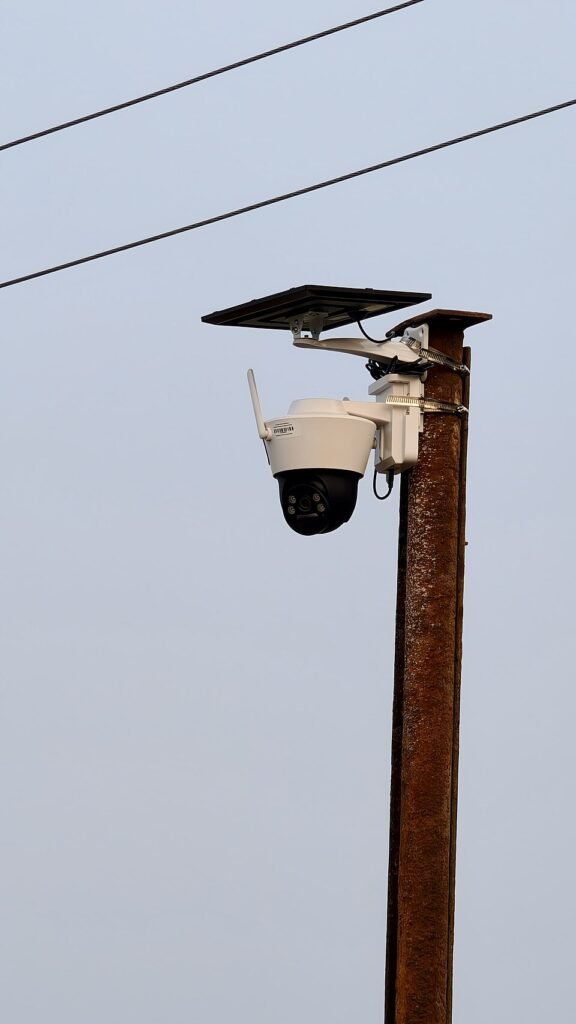
Choose a chicken coop camera by the power and network available at the mounting point, then by the recording you need. A powered Wi-Fi camera with local storage suits a different job from a battery event camera or a cellular solar model. These five options cover those arrangements; none replaces secure housing, daily flock care or a direct check when a bird needs attention.
We may earn a commission when you buy through links on this page.
Our picks at a glance
Start with the features that fit your setup.
Fixed view with local recording
Wyze Cam v4

A plug-in fixed camera with microSD recording. Outdoor placement requires the maker’s compatible outdoor power arrangement, not just an IP65 camera body.
- Power
- Plug-in power
- Connection
- Wi-Fi
Beyond an available Wi-Fi network
SEHMUA 4G LTE Solar Camera

A cellular alternative, not a way to extend Wi-Fi. Confirm the exact SIM arrangement, paid service and solar placement before ordering.
- Power
- Rechargeable battery + solar panel
- Connection
- 4G LTE; no Wi-Fi
Also in this guide
- Wyze Cam Pan v4Remote pan and tilt
- TP-Link Tapo C120Alternative wired fixed view
- Blink Outdoor 2K+ Kit with Sync Module CoreBattery-powered event view
Chicken coop cameras compared
| Product | Power | Connection | Recording | View and package |
|---|---|---|---|---|
| Wyze Cam v4 | Plug-in power | Wi-Fi | microSD; optional paid cloud | 2.5K; fixed view |
| Wyze Cam Pan v4 | Plug-in power | Dual-band Wi-Fi | microSD; optional paid cloud | 4K; motorized pan/tilt |
| TP-Link Tapo C120 | Plug-in power | Wi-Fi | microSD; optional Tapo Care | 2K-class; fixed view |
| Blink Outdoor 2K+ Kit with Sync Module Core | AA lithium batteries; module plugs in | Wi-Fi + Sync Module | Core: no local storage; paid cloud for clips | 2K; one outdoor camera + doorbell bundle |
| SEHMUA 4G LTE Solar Camera | Rechargeable battery + solar panel | 4G LTE; no Wi-Fi | Local SD/cloud; cellular service paid | 2K; remote pan/tilt view |
Five chicken coop camera options
01 / Fixed view with local recording
Wyze Cam v4
Best for: A fixed coop or run view where suitable power and Wi-Fi are available and local recording matters.
- Power
- Plug-in power
- Connection
- Wi-Fi
Why consider it
- Fixed view stays on a chosen entrance or area
- Local microSD recording documented by Wyze
- Optional cloud services can be evaluated separately
Keep in mind
- Needs continuous suitable power and Wi-Fi at the site
- Outdoor power equipment and memory card may add separate requirements
Read the full analysis of Wyze Cam v4
Wyze Cam v4 is the fixed-view option here for a powered location. Wyze documents 2.5K video and local microSD recording, with a card purchased separately. A fixed view can suit one entrance or a defined section of the run because the camera keeps looking at that area instead of turning away to follow another event.
The power installation is part of the purchase. The camera is IP65-rated, but the supplied indoor power arrangement does not become outdoor-rated because the camera body can go outside. Use Wyze’s compatible outdoor adapter arrangement for this model and follow its mounting and connection instructions. Check which parts are in the selected kit.
Local card recording and paid cloud or AI features are different services. Decide which recording behavior you need before accepting a trial as the long-term plan. We have not tested Wi-Fi reach through a coop, identification of individual hens or performance through mesh. Confirm the live view and playback at the mounting point before relying on the view.
Key specs: Wyze Cam v4; 2.5K video; fixed view; plug-in power; Wi-Fi; microSD recording with compatible card; outdoor use requires compatible outdoor power equipment.

02 / Remote pan and tilt
Wyze Cam Pan v4
Best for: A powered location where you want to look around a larger area remotely, while accepting that one lens cannot watch every direction at once.
- Power
- Plug-in power
- Connection
- Dual-band Wi-Fi
Why consider it
- Remote pan and tilt for checking more than one area
- Current 4K Pan model with local storage support
- Manufacturer clearly identifies its outdoor adapter requirement
Keep in mind
- One moving lens does not record all directions simultaneously
- Universal outdoor power adapter is a separate requirement
Read the full analysis of Wyze Cam Pan v4
Wyze Cam Pan v4 adds motorized pan and tilt to a 4K camera. Wyze documents 360-degree pan and 180-degree tilt, with app control and local microSD storage. That can help a keeper look between an entrance and another part of a run, but the advertised movement range is not simultaneous video of every direction.
For outdoor use, Wyze specifically requires the Wyze Cam Universal Power Adapter, sold separately. Its support page says the included cable is not outdoor-rated. Do not substitute the power requirements of an older Pan model or assume a compatible camera mount also establishes a compatible electrical connection.
Use remote movement as a viewing tool, not proof that automated tracking will follow every chicken or predator. A moving camera can face away from the entrance at the moment you want to review. If an uninterrupted doorway view is the priority, consider a fixed placement or a separate view rather than treating pan range as equivalent coverage.
Key specs: Wyze Cam Pan v4; 4K; 360° pan and 180° tilt; dual-band Wi-Fi; plug-in power; microSD support; Universal Power Adapter required outdoors.

03 / Alternative wired fixed view
TP-Link Tapo C120
Best for: A fixed view for a keeper who wants the Tapo app and a documented local-card option, with indoor placement for the supplied adapter.
- Power
- Plug-in power
- Connection
- Wi-Fi
Why consider it
- Local-card recording documented in the quick-start guide
- Fixed view for a defined entrance or run section
- Separate local storage and optional cloud choices
Keep in mind
- Supplied adapter is indoor-only under the linked US guide
- Hardware revision and card compatibility need checking
Read the full analysis of TP-Link Tapo C120
Tapo C120 is a fixed Wi-Fi camera with 2K-class video and local microSD recording. The camera’s magnetic-base design can help position a view, but a convenient mounting surface is not proof that it is secure or suitable in a dusty, active coop. Follow the mounting instructions and keep equipment beyond bird contact.
TP-Link’s US quick-start guide states that the supplied adapter should be used indoors. Plan the power route with that restriction in mind; an IP66 camera rating does not make the adapter outdoor equipment. Check the hardware revision and current instructions supplied with the exact camera, since accessory and firmware details can vary.
A compatible microSD card must be installed and initialized for local recording. Tapo Care cloud storage is a separate optional service. Choose this model because its documented recording arrangement and app fit your setup, not because a subscription-free card option guarantees remote access during a network outage. Confirm actual playback and the live view after installation.
Key specs: Tapo C120; 2K-class fixed video; Wi-Fi; plug-in power; compatible microSD card sold separately; optional Tapo Care; supplied adapter indoor-only per US guide.

04 / Battery-powered event view
Blink Outdoor 2K+ Kit with Sync Module Core
Best for: A Wi-Fi location without camera-side power when motion-event viewing suits the job and you accept the selected bundle and recording plan.
- Power
- AA lithium batteries; module plugs in
- Connection
- Wi-Fi + Sync Module
Why consider it
- No camera-side mains cable for the battery-powered view
- Exact bundle includes the required Sync Module Core
- Outdoor 2K+ model has documented 2K video and operating specifications
Keep in mind
- Core cannot provide local storage or clip backup
- Selected offer includes a doorbell unrelated to the coop-view task
- Cloud clip storage adds a paid-plan requirement after the trial
Read the full analysis of Blink Outdoor 2K+ Kit with Sync Module Core
The exact current offer is a bundle containing one Blink Outdoor 2K+ camera, a Battery Doorbell 2K+ and a Sync Module Core. The outdoor camera is the coop-viewing component assessed here. The doorbell is an additional product, not a second outdoor camera or evidence of wider coop coverage. Earlier camera-only links led to different bundles, so the selected ASIN and contents matter.
Blink documents AA lithium-battery power for Outdoor 2K+ and a required Sync Module connection to Wi-Fi. Keep the powered Core module indoors in a dry, protected location: Blink says it is not weather-resistant. The camera can suit a location without a power cable at the camera, but the system still needs that indoor module, a working network and maintenance. Do not choose this battery-event arrangement as a substitute for documented continuous recording.
The Core module does not support local storage or clip backup. After any applicable trial, cloud clip storage requires an appropriate paid Blink plan. Other Blink modules have different capabilities, but they are not the module in this bundle. Compare the exact package and ongoing recording requirement; a generic claim that Blink supports USB storage does not apply to Core.
Key specs: Selected bundle: one Outdoor 2K+ camera, one Battery Doorbell 2K+, Sync Module Core; camera uses AA lithium batteries; Wi-Fi required; Core has no local storage or clip backup.
05 / Beyond an available Wi-Fi network
SEHMUA 4G LTE Solar Camera
Best for: A site beyond usable Wi-Fi where the included SIM service has suitable cellular coverage and a data plan is acceptable.
- Power
- Rechargeable battery + solar panel
- Connection
- 4G LTE; no Wi-Fi
Why consider it
- Cellular connection for a site without usable Wi-Fi
- Battery and solar arrangement avoids camera-side mains wiring
- Remote pan/tilt can help inspect more than one area
Keep in mind
- Requires suitable 4G coverage and ongoing cellular service
- Built-in SIM arrangement limits carrier flexibility
- Solar charging depends on installation and available sunlight
Read the full analysis of SEHMUA 4G LTE Solar Camera
The selected SEHMUA offer is a 2K pan-and-tilt cellular camera with a rechargeable battery and solar panel. It does not connect through Wi-Fi. This makes it a candidate for a location beyond the home network only when the supported 4G service works at the actual mounting point; a map or a phone’s connection is not proof of identical camera reception.
The listing and SEHMUA’s CB14S documentation identify a built-in SIM arrangement that requires paid cellular service after its trial. The manufacturer says the built-in SIM is not customer-replaceable. Do not assume you can insert a spare household SIM or avoid the data service by choosing local storage. Check the current service terms and coverage for the supplied version.
SEHMUA lists local SD and cloud storage choices, but the data connection and storage service are separate questions. Confirm which card and accessories the exact kit includes. Charge and install according to its instructions, and keep a charging plan for poor sunlight. Solar replenishment is not a guarantee of uninterrupted operation or continuous recording.
Key specs: Selected SEHMUA cellular offer: 2K, 4G LTE, no Wi-Fi; rechargeable battery and solar panel; built-in SIM service; local SD/cloud options subject to the exact kit and plan.
How we chose
We compared exact current offers with manufacturer specifications for power, connection, local recording, cloud requirements and installation limits. Wyze, TP-Link, Blink and SEHMUA documentation was checked alongside the selected Amazon pages and photographs. The two highlighted choices represent a fixed powered view and a cellular location beyond Wi-Fi, not first and second place in a video-quality test.
We excluded older Pan models when the current Pan v4 could be verified. We also refused several image captures where a camera-only ASIN led to a different bundle. The selected Blink entry is identified as the actual outdoor-camera-and-doorbell bundle, including its Core module. It is not described as a camera-only kit, and the bonus doorbell is not counted as another coop view.
We have not installed these cameras, measured reception or compared footage. Resolution and weather ratings are manufacturer specifications, not our image-quality results. Claims about tracking pets, identifying people or two-year battery life do not establish reliable chicken detection or performance in your coop. No purchase is based on a customer star rating or an invented test.
How to choose a chicken coop camera
Decide whether you need a live check or a recording
A live view answers what the lens sees now. A stored clip answers what it recorded earlier. Continuous local recording, motion-event clips and cloud storage have different requirements. Write down the job before choosing: checking that the flock is inside, reviewing activity at an entrance or observing a particular part of the run. One camera may not cover all of them equally.
For example, a keeper investigating what happened at a doorway may want a fixed view that retains the surrounding sequence. A moving lens could be looking elsewhere, and an event camera may record only after its trigger responds. This is a planning distinction, not a claim that a particular product missed an event in our use.
Check power at the camera and every required accessory
For plug-in cameras, identify the permitted power arrangement and cord route before buying. Wyze’s outdoor instructions require compatible outdoor power equipment; Pan v4 specifically requires the Universal Power Adapter because its included cable is not outdoor-rated. TP-Link’s linked C120 US guide specifies indoor use for the supplied adapter. A weather-rated camera body does not confer the same rating on every supplied part.
Battery power avoids a mains cable at the camera, but it adds charging or battery replacement. Blink’s Sync Module still needs power and network access. Solar charging adds a panel that needs an appropriate location and a plan for weak sunlight. Do not treat either battery or solar as maintenance-free operation.
Verify the network where the lens will sit
Test the required connection at the mounting location before making the installation permanent. Distance, walls, metal panels and the router’s position can affect what is available there. We do not assign a universal coop range to any camera, and a working phone beside the back door does not demonstrate that the camera connects at the far side of a run.
Cellular models solve a different problem from weak Wi-Fi. The selected SEHMUA uses its supported 4G service, not your router. Confirm its SIM arrangement and current plan terms and verify reception at the site. Do not assume a nearby phone using another carrier proves the required service is available to the camera.
Separate a memory card from a cloud subscription
For a local-card camera, check the exact model and hardware revision, compatible card and setup steps. TP-Link’s C120 guide requires initializing a card in the app. Wyze documents local microSD recording with a compatible card. Do not assume the card is included because a listing mentions the maximum supported capacity or shows a card slot.
Cloud storage is a separate service to evaluate after any trial. The selected Blink bundle needs particular care: Blink’s Core FAQ explicitly says Core has no local storage or clip backup. Capabilities of Sync Module 2 or XR do not transfer to it. The SEHMUA’s cellular data service is also distinct from its local or cloud storage arrangement.
Plan a view you can actually interpret
Choose the scene before the mount. Decide whether the doorway, roost approach or run area is the priority, and keep hardware and cables beyond bird contact. Check the field of view in the app rather than assuming the position looks right from the ground. Keep the lens accessible for cleaning without entering an unsafe position or dismantling a roof.
Avoid looking through a nearby obstruction if it blocks the scene. Mesh, a window, dust or a close surface can change the usable picture, particularly when night illumination reflects toward the lens. Check the actual night view as well as the daytime view. A higher resolution label cannot recover an area hidden behind a beam or a camera pointed in the wrong direction.
Use alerts as a prompt to check, not proof that every event was detected. The manufacturer’s person, vehicle or pet categories are not verified identification of individual chickens. Confirm that the app’s view and recording behavior suit your task, and keep care decisions grounded in direct observation. A camera cannot diagnose an animal’s condition.
Use the exact installation guide for the supplied version
The C120 US quick-start guide illustrates why accessory restrictions need reading: it addresses the power adapter and the camera’s connections separately. Follow your delivered revision’s instructions instead of copying a mounting photograph that omits the power route. For Pan v4, use Wyze’s explicit outdoor-adapter requirement.
After setup, check live viewing and playback, confirm the intended recording mode and see what happens when an optional trial ends. Keep the app and firmware maintained according to the maker’s instructions, use account protections offered by the service and keep the camera’s view limited to the area you intend to monitor. Do not expose a feed or share access simply to make installation convenient.
FAQ
Can I use an indoor camera outside the coop?
Use a camera and power arrangement explicitly permitted for that location. A sheltered-looking position does not override indoor-only equipment instructions.
Do coop cameras work without Wi-Fi?
The selected SEHMUA uses 4G instead of Wi-Fi, with coverage and paid cellular-service requirements. The other selected arrangements require their documented network connections.
Does Sync Module Core record to USB or a memory card?
No. Blink states that Core does not support local storage or clip backup. Do not transfer the features of another Sync Module to the Core in this bundle.
Does a pan-and-tilt camera watch every direction at once?
No. Its lens points in one direction at a time. Movement range is not simultaneous recorded coverage of the entire area.
Can I use a camera instead of checking the flock?
No. A camera view can be incomplete or unavailable. Keep daily care and direct checks, and seek appropriate help for animal-health concerns.
Choose the connection and recording arrangement first
Start with available power, a verified network and the scene you need to review. Then match the exact kit, required adapters, storage and ongoing service. A well-planned fixed view can be more useful than extra movement or resolution that does not fit the job. Keep physical coop protection and direct flock care in place regardless of the camera selected.
Cover photograph by Eyetechsecurities, CC BY 4.0, via Wikimedia Commons. This contextual photograph does not depict a selected product or certify the photographed installation.
